Electrical Certification Software for Windows, Desktop & Browser
Electrical certification doesn’t always happen on one device.
An electrician might complete an EICR on a tablet while on site, check information from a phone later in the day, and have a Qualified Supervisor review the same certificate from a Windows PC in the office.
That’s why Certly is designed to work across mobile, tablet and desktop, giving electricians and electrical contractors more flexibility over where and how certification gets completed.
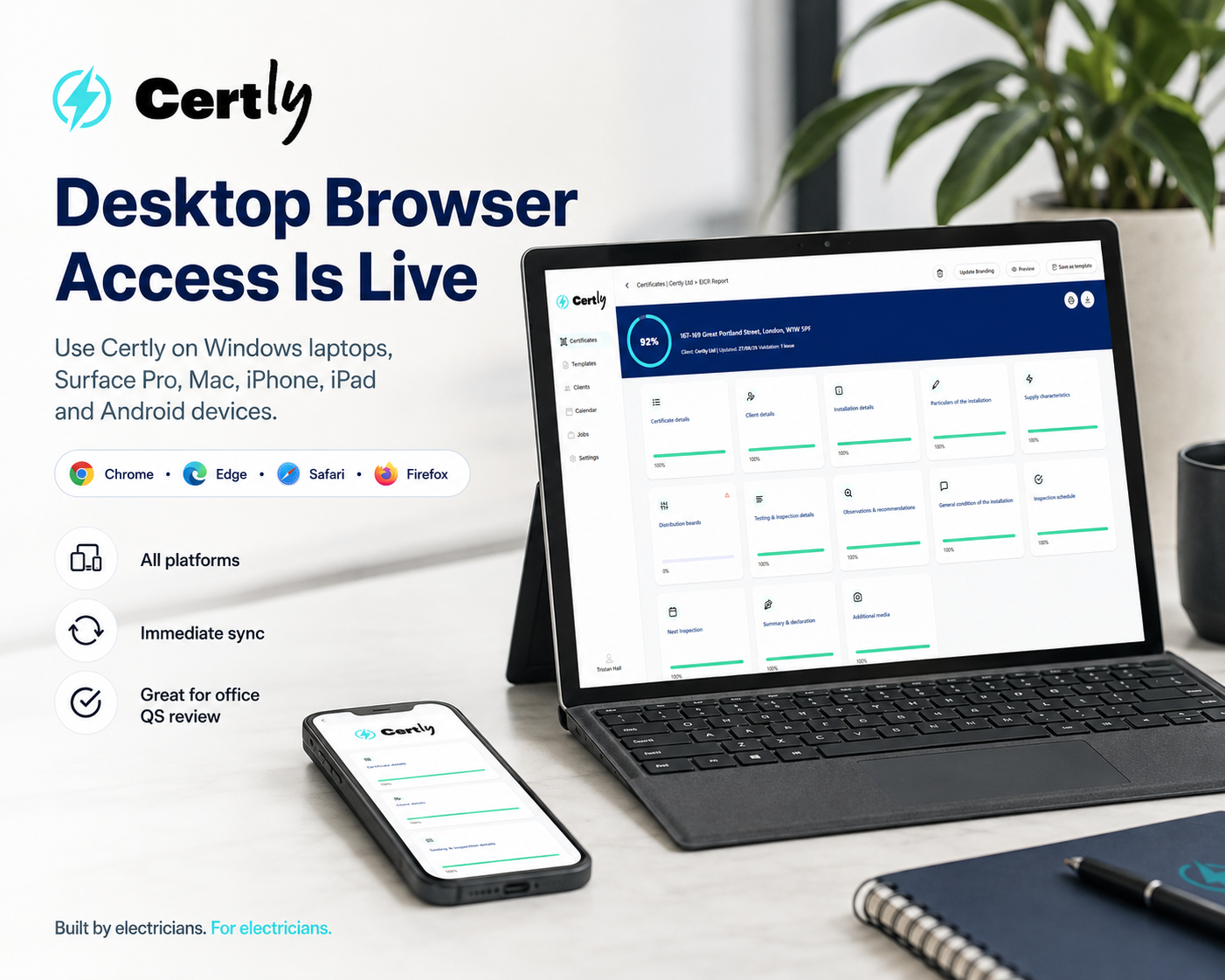
Alongside the Certly apps for iOS and Android, full desktop browser access is now live — including access from Windows computers, laptops and devices such as the Microsoft Surface Pro.
Your certification workflow no longer needs to revolve around one particular device.
Electrical Certification Software for Windows
For electricians and electrical contractors who prefer working from a computer, Certly can now be accessed through a web browser on Windows PCs and laptops.
That includes devices such as a Microsoft Surface Pro or Surface Laptop, as well as traditional Windows desktop computers and laptops from manufacturers such as Dell, HP, Lenovo and others.
For electricians already using a Surface Pro on site, this means Certly can be accessed directly through the browser without needing to move to a completely different device just to manage electrical certification.
Tasks that may feel more comfortable on a larger screen — such as reviewing electrical certificates, checking circuit schedules or carrying out QS reviews — can also be handled from a desktop or laptop.
For anyone searching for electrical certification software for Windows, electrical certificate software for Surface Pro, EICR software for Windows or electrical certificate software for PC, Certly provides a flexible way to work across both site and office environments.
Use Certly Across Phones, Tablets, Laptops and Computers
Different parts of electrical certification suit different devices.
On site, a phone or tablet might be the quickest option.
An electrician using an iPad, iPhone, Android tablet, Samsung Galaxy tablet or Microsoft Surface Pro can choose the device that best fits the job.
Back at the office, a Windows laptop, desktop PC, MacBook or iMac may be more practical for reviewing and managing certification.
Certly can therefore form part of a workflow across devices including:
- iPhone and iPad
- Android phones and tablets
- Microsoft Surface Pro and other Windows tablets
- Windows PCs and laptops
- MacBook and iMac computers
- other supported computers using a modern web browser
The important part isn’t the brand of device.
It’s being able to use electrical certification software on the device that makes sense for the work you’re doing.
Access Certly Through Your Web Browser
Desktop access means Certly isn't restricted to a traditional installed desktop application.
It can be accessed through modern web browsers such as Google Chrome, Microsoft Edge, Safari and Firefox.
That gives electricians and contractors another level of flexibility.
A QS using Microsoft Edge on a Windows office PC can access Certly.
An electrician using Chrome on a Surface Pro can access Certly.
A contractor working from a MacBook can access Certly through the browser.
And engineers can continue using the Certly app on their iPhone, iPad or Android device while on site.
This makes Certly a practical option for businesses looking for browser-based electrical certification software rather than software tied to one operating system or one particular device.
Save on One Device. Access the Update on Another.
Multi-device access becomes much more useful when your certificate information moves with you.
Certly provides immediate certificate sync across devices.
An electrician can make changes to an EICR or other certificate on a phone, tablet or computer and press save. Refresh Certly on another logged-in device and those saved changes are already available.
That could mean:
Engineer on site using an iPad → saves the certificate → QS refreshes Certly on a Windows PC → the latest certificate information is immediately available for review.
Or:
Electrician using a Surface Pro → saves the EICR → opens Certly later from a home laptop → the latest saved certificate is already there.
There’s no need to export the certificate, email a file to yourself or manually transfer information from one device to another.
The certificate remains within Certly.
A More Flexible Way to Complete EICRs
An Electrical Installation Condition Report can contain a huge amount of information.
Installation details, distribution boards, circuit schedules, test results, observations and classifications may all need to be recorded before an EICR is complete.
Being able to work across different devices means electricians can choose the setup that suits each part of the process.
A tablet such as an iPad or Surface Pro may be ideal while carrying out inspection and testing.
A phone might be useful for quickly checking information.
A Windows desktop or laptop may be better suited to reviewing the completed report from the office.
We've looked specifically at how modern EICR software can make Electrical Installation Condition Reports easier to complete and manage.
EICR Software for Windows and Surface Pro
For electricians specifically looking for EICR software for Windows or EICR software for Microsoft Surface Pro, browser access opens up another way to use Certly.
A Surface Pro can be particularly useful because it sits somewhere between a traditional tablet and a Windows laptop.
That means an electrician can use the same device while moving around an installation and then switch to a more desktop-style workflow when required.
Similarly, contractors using Windows PCs in the office can access the same Certly system without needing engineers and supervisors to use identical hardware.
The certification follows the account and workflow, rather than being restricted to one type of device.
Desktop Access Makes QC Relay Even More Flexible
Desktop/browser access becomes particularly useful for businesses using a Qualified Supervisor.
The electrician completing the work may spend most of the day on site.
The QS may spend most of their time in the office.
It makes little sense to force both people to work from the same type of device.
Certly's QC Relay allows certificates to move between electrician and Qualified Supervisor within Certly, while desktop access means the QS can review certificates from a Windows computer, Mac or laptop.
A typical workflow could now look like this:
Engineer completes an EICR on a tablet or Surface Pro.
The certificate is submitted through QC Relay.
The QS opens Certly from a Windows PC in the office.
The latest certificate is reviewed and any required changes are sent back through Certly.
We've explained the full process in Meet Certly QC Relay: The Cleanest Route to QS Sign-Off.
Multiple Qualified Supervisors Can Work More Flexibly Too
Certly also supports multiple Qualified Supervisors.
For contractors with more than one QS, browser access means supervisors aren't dependent on one particular device or one physical location.
Different QSs can access Certly from their own computers and review certificates as required.
That becomes particularly useful where:
- engineers are spread across different jobs
- QS responsibilities are divided between teams
- certificate volumes are high
- one QS is unavailable
- office-based supervisors need access to certificates being completed in the field
Combined with immediate device sync, the engineer and QS can work much more naturally as part of the same certification workflow.
No Device Lock-In
Certly accounts aren't designed around tying electricians to one specific phone, tablet, laptop or PC.
That matters because electrical contractors don't all work in the same way.
One engineer might prefer an iPad.
Another might use a Samsung Android tablet.
Someone else may already carry a Microsoft Surface Pro.
The QS might work primarily from a Windows desktop PC.
With Certly, the device becomes a choice rather than a restriction.
Use the device that suits the job.
Your electrical certification software should fit around the way you work — not force your business to work around the software.
Electrical Certificate Management From a Windows PC or Laptop
Desktop access isn't only useful while completing a certificate.
Electrical contractors also need to manage everything surrounding certification.
That can include checking certificate progress, finding historical records, managing jobs, reviewing engineer submissions and overseeing QS sign-off.
Being able to do this from a desktop or laptop gives office-based contractors another practical way to manage certification.
We've covered the wider workflow in our guide to electrical certificate management software for contractors.
One Electrical Certification Workflow Across Every Device
The real benefit of desktop and browser access isn't simply that Certly now works on more platforms.
It's that the different devices can form part of the same workflow.
An engineer can work from a phone, tablet or Surface Pro on site.
An office team can access Certly from a Windows computer.
A QS can review certification from their laptop.
And when somebody saves a certificate, those saved changes can be available on the other devices immediately after refresh.
That creates a much more flexible way for electricians, contractors and Qualified Supervisors to work together.
What Should Electrical Certification Software for Windows Offer?
If you're comparing electrical certification software for Windows, EICR software for PC or software for a device such as the Microsoft Surface Pro, don't only ask whether it opens on that device.
Ask whether the whole workflow works across your business.
Can engineers use mobile or tablet devices on site?
Can office staff use Windows PCs and laptops?
Can Certly be accessed through common web browsers?
Can a QS review certificates from the office?
Are saved certificate changes immediately available across devices?
Can multiple Qualified Supervisors work within the same certification workflow?
Are users tied to one particular device?
The value comes from all of those pieces working together.
Electrical Certification Software That Works Around You
Certly is built to give electricians and electrical contractors more freedom over how they complete, review and manage certification.
Use an iPhone, iPad, Android phone or Android tablet while working on site.
Use a Microsoft Surface Pro where you want the flexibility of a Windows tablet and computer.
Use a Windows PC or laptop from the office.
Use a MacBook or iMac through the browser.
And move between those devices while keeping your electrical certification within the same Certly workflow.
Combined with immediate certificate sync, QC Relay and multiple QS sign-off, desktop/browser access creates a much more flexible way for engineers in the field, supervisors in the office and contractors managing the wider business to work together.
Because electrical certification shouldn't dictate what device you use or where you work.
Certly fits around your workflow.
Quickly. Simply. Certly.
Working on Electrical Installation Condition Reports? Explore Certly’s EICR software, see the workflow and try it for free.