
LAST SALE OF THE YEAR.
BLACK FRIDAY
+ CYBER WEEK SALE
Save time on certs.
Save money doing it, too.
CLAIM ON THE WEBSITE.
NOT IN THE APP.app.certly.co.uk
Show me how to claimNOT IN THE APP.app.certly.co.uk
- Use a browser on your phone, tablet or computer.
- Do not use the installed iPhone or Android app to claim.
15Days10Hours56Mins43Secs
21 NOVEMBER — 6 DECEMBER
Ends Sunday 6 December at 11:59pm UK time.
£149.99 + VAT
£99
+ VAT per annual licence
For the first year.
SAVE over £50
per licence
per licence
YOUR OFFER CODEBF99
YOUR DISCOUNT. A FEW SIMPLE STEPS.
Here’s how to claim.
- Choose the option that applies to you.
- Your instructions will expand below your selection.
- You must claim through app.certly.co.uk in your web browser.
New customer / not subscribed yet
- 01
Create an account, or sign in.
app.certly.co.uk- Open app.certly.co.uk in your web browser.
- New to Certly? Click Sign up and create your account.
- Already have an account or trial? Sign in with your existing details.
- Do not use the installed iPhone or Android app to claim.
- 02
Go to Licences & billing.
- Click Settings in the left-hand menu.
- Click the Team & Licences tab at the top.
- Click Licences & billing in the section menu on the left.
SettingsTeam & LicencesLicences & billing - 03
Choose how many licences.
- Full licence and Annual are selected by default. Leave these as they are.
- Enter the number of new licences you want: 1–50.
- Click the Purchase button below the total.
- This opens Stripe checkout.
 View purchase controls at full size
- 04
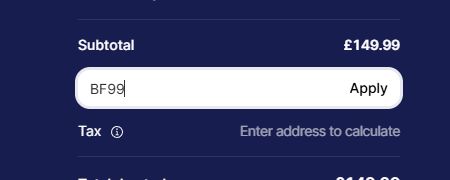
Enter BF99 at Stripe checkout.
- Click Add promotion code.
- Type BF99.
- Click Apply.
- 05
Check your saving, then pay.
- Check that BF99 has been applied.
- Complete your payment.
- Return to Certly to assign your new licences.
- Discount missing? Contact us before paying.
EVERY ELIGIBLE LICENCE.SAVE over £50
per licenceFirst-year saving, excluding VAT.
Existing monthly subscriber
How do you pay for your monthly subscription?
Desktop / website subscription (Stripe)
Switch to annual when your paid month ends.
- Keep your existing licences, assignments and certificates.
- Your annual term starts when your paid month ends.
- Your BF99 annual payment is scheduled for that date.
- Later annual renewals use the normal annual price.
- 01
Sign in to your existing account.
app.certly.co.uk- Open app.certly.co.uk in your web browser.
- Sign in with your existing Certly email and password.
- Keep using the same company account.
- Do not use the installed iPhone or Android app to claim.
- 02
Go to Licences & billing.
- Click Settings in the left-hand menu.
- Click the Team & Licences tab at the top.
- Click Licences & billing in the section menu on the left.
SettingsTeam & LicencesLicences & billing - 03
Convert your monthly licences to annual.
- Under Full licences, click Monthly.
- Under the renewal date you want, click View & manage licences.
- Tick the licences you want to convert.
- Enter BF99 in the Offer code box.
- Click Convert selected to annual.
- 04
Check and confirm.
- Check your start date, BF99 payment and annual renewal details.
- Read the payment authorisation.
- Click Confirm selected changes.
- 05
Your annual switch is scheduled.
- Keep working on your existing monthly licence until the usual expiry.
- Your annual licence will start when your monthly subscription expires. BF99 will be used.
- Your saved subscription view shows the monthly end, annual start and renewal date.
App Store subscription (Apple / Google Play)
APPLE APP STORE / GOOGLE PLAY
Just email us before 6 December.
- Email hello@certly.co.uk before 6 December at 11:59pm UK time.
- We’ll check your subscription and reply with a bespoke offer code and when to use it.
- If your paid store subscription ends after the sale, you can still claim with the code we provide.
Please email us before buying.
- Keep using your existing Certly account.
- Buying through the website does not cancel your Apple or Google subscription.
Existing annual subscriber
Add licences to your existing company.
- Buy only the additional full annual licences you need.
- Your current annual licences keep their existing renewal dates.
- The new licences start when you buy them.
- 01
Sign in to your existing account.
app.certly.co.uk- Open app.certly.co.uk in your web browser.
- Sign in with your existing Certly email and password.
- Keep using the same company account.
- Do not use the installed iPhone or Android app to claim.
- 02
Go to Licences & billing.
- Click Settings in the left-hand menu.
- Click the Team & Licences tab at the top.
- Click Licences & billing in the section menu on the left.
SettingsTeam & LicencesLicences & billing - 03
Choose how many licences.
- If shown, click Buy additional licences to open the purchase options.
- Full licence and Annual are selected by default. Leave these as they are.
- Enter the number of additional licences you want: 1–50.
- Click the Purchase button below the total.
- This opens Stripe checkout.
View purchase controls at full size - 04
Enter BF99 at Stripe checkout.
- Click Add promotion code.
- Type BF99.
- Click Apply.
- 05
Check your saving, then pay.
- Check that BF99 has been applied.
- Complete your payment.
- Return to Certly to assign your new licences.
- Discount missing? Contact us before paying.
EVERY ELIGIBLE LICENCE.SAVE over £50
per licenceFirst-year saving, excluding VAT.
THE IMPORTANT DETAILS
Before you claim.
Clear answers, so you know exactly what you’re buying.
Who can claim?
- New subscribers buying full annual licences.
- Existing customers buying additional full annual licences.
- Existing full monthly Stripe subscribers switching to annual at the end of their paid month.
- Apple/Google monthly subscribers: email hello@certly.co.uk before the sale ends so we can arrange a bespoke code.
Can I buy more than one licence?
- Buy 1–50 full annual licences per purchase.
- BF99 discounts every eligible licence in the purchase.
- Use BF99 again for further qualifying purchases before the deadline.
What will I pay at checkout?
- Advertised offer: £99 + VAT per annual licence.
- New or additional licences: enter BF99 at Stripe checkout.
- Stripe monthly-to-annual switches: enter BF99 in the switch section in Certly.
- One licence actually costs £98.99 + VAT for the first year.
- Multi-licence totals may differ by a few pence due to Stripe’s rounding.
What happens at renewal?
- The discount applies once, to the first annual payment.
- It does not repeat at renewal.
- Current normal renewal price: £149.99 + VAT per full annual licence.
Does it include monthly or office licences?
- Full annual licences only.
- Monthly payments are not discounted.
- Existing full monthly Stripe subscribers can use the monthly-to-annual instructions above.
- Office licences are excluded.
Can I claim through the iPhone or Android app?
- Open app.certly.co.uk in a web browser.
- Use your phone, tablet or computer.
- Do not use App Store or Google Play checkout for this offer.
- After buying, use your Certly account across your supported devices.
I already have an account. Do I need a new one?
- No—use your existing company account.
- Choose the instructions for your current subscription above.
- Your existing licences and certificates stay in place.
A REAL TEAM. READY TO HELP.
Need a hand switching?
- Get help setting up your account.
- Move your clients and addresses over.
- Add licences for your team.
- Offer dates: 21 November–6 December 2026.
- Ends 6 December at 11:59pm UK time.
- New or additional licences: enter BF99 at Stripe checkout.
- Existing monthly Stripe subscriptions: enter BF99 in Certly’s annual-switch section.
- Apple/Google monthly subscribers: email hello@certly.co.uk before the deadline to arrange a bespoke offer code.
- Full annual licences, including eligible Stripe monthly-to-annual switches.
- Advertised price: £99 + VAT per annual licence.
- Actual checkout for one licence: £98.99 + VAT.
- Usual price: £149.99 + VAT.
- Discount applies once.
- Renewals use the normal applicable price.
- Monthly payments and office licences are excluded.
- Web purchases only.
- Terms and conditions.